28081eb7-4ef4-467e-b33c-7b20c70cfc35|0|.0
- I was trying to create an .ico file from a .bmp file for a new application I am developing. Here is a link to a free Online Image Converter from CoolUtils. For free, it converted my .bmp file to an .ico file. Thanks CoolUtils!.
- How to get size information about a Microsoft SQL Database:
Run stored procedure: sp_spaceused
c2e12e66-d951-4b32-a450-8af4f2a05798|0|.0
- Syntax for passing a parameter to a Windows Service from the command line:
net start WindowsServiceName /ParameterName
08/19/2011 The above step was not working. The parameter was not being passed to the service. Instead, after intalling the service, I modified the registry.
HKEY_LOCAL_MACHINE\SYSTEM\CurrentControlSet\Services\service name
Within the key of your chosen service name you will find a value pair named ImagePath which is associated with the path to the service complete with any related parameters.
For example: "C:\Program Files\WindowServiceProgramName.exe" ParameterName (Notice that the parameter goes OUTSIDE of the quotes of the path to the executable.)
Here is the link where I found this information.
d391a0e0-3c4c-46b2-a155-0ac1256f36fc|0|.0
I was developing a Windows Forms application that made use of the datagridview control. I created a UserDeletingRow event handler that included a message box prompt warning the user that they were about to delete a row. Initially, the UserDeletingRow event handler worked fine; however, after making some code changes to other parts of the code behind page for the form, the UserDeletingRow event stopped firing. I checked the AllowUserToDeleteRows property for the datagridview and it was set to true. I also checked the VirtualMode property and it too was set to true.
To make a long story short, it turns out the culprit was a comboBox.Focus() statement. In my code, I added the comboBox.Focus() statement to a routine that executed in conjunction with a datagridview RowEnter event. After commenting out the statement, the UserDeletingRow event resumed firing.
892a2025-b304-4a3c-91af-796c0f19c76a|1|5.0
-
Resetting the value of an Identity column in T-SQL
DBCC CHECKIDENT (tablename, reseed, 7) -- When you insert a row, the Identity column will have a value of 8.
SELECT CONVERT(DATETIME, CONVERT(CHAR(8), 20070824))
a972f281-0bfd-424a-8959-24e171f94cf4|0|.0
Trucate table destination_tablename
Insert Into destination_tablename
Select * from source_tablename
- T-SQL to count columns in a table:
SELECT count(column_name) from Information_schema.columns where table_name = 'Table_Name'
cf522c00-8485-42a9-801c-faa54e45758c|0|.0
I created a simple SSIS package to copy a table from one database to another. The source and destination connections used SQL Server authentication.
When I tried to run the package in an SQL Agent job I received an error message: [DTS.Pipeline] Error: component "Source - History" (1) failed validation and returned error code 0xC020801C.
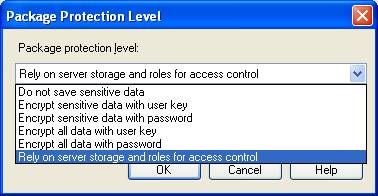
Here was the fix for me. When I imported the SSIS package to Integration Services, I set the Package Protection Level to “Rely on server storage and roles for access control.”
These links helped in solving the problem:
http://support.microsoft.com/kb/918760
http://msdn.microsoft.com/en-us/library/microsoft.sqlserver.dts.runtime.dtsprotectionlevel.aspx
http://www.codeproject.com/KB/aspnet/Schedule__Run__SSIS__DTS.aspx
01da8860-0bd8-4af1-8b22-787814814a92|1|5.0
I tried executing the following Bulk Insert command, having UNC paths, from SQL Server Management Studio running on my laptop and connected to the appropriate database. I connected using Windows Authentication.
BULK INSERT dbo.Load_itemDetail
FROM '\\server1\Outbound\orditem.txt'
WITH (FORMATFILE = '\\server1\Outbound\FormatFiles\ORDITEMNEW.FMT')
I then received the following error message:
Msg 4860, Level 16, State 1, Line 2 Cannot bulk load. The file "\\server1\Outbound\orditem.txt" does not exist.
When I had our administrator run the bulk insert command from within SQL Server Management Studio running on the same machine as the SQL Server instance, the command worked.
Fix: When running SQL Server Management Studio from a machine other than the machine where the SQL Server instance resides, you need to connect to the server where the database resides using SQL Server authentication. The SQL Server login account that you use to connect must also have the "bulkadmin" server role assigned to it. After logging in with SQL Server authentication, I was able to execute the Bulk Insert command without error.
62fc2edd-2411-469d-a52e-4f5ed84d7845|3|1.3
1) Content Delivery Network (CDN)
From Scoth Guthrie: Microsoft Ajax CDN (Content Delivery Network) is a service that provides caching support for AJAX libraries (including jQuery and ASP.NET AJAX). The service is available for free, does not require any registration, and can be used for both commercial and non-commercial purposes. Using a CDN can significantly improve a website's end-user performance, since it enables browsers to more quickly retrieve and download content.
Link to CDN site: http://www.asp.net/ajaxlibrary/CDN.ashx
2) With jQuery, there are two versions minified and full. Use the full version if you want to debug.
jQuery version 1.4.1
3) To get intellisense with JQuery you can enter /// <reference path="jquery-1.2.3.js" /> to the start of your script. For more information, check a James Hart blog entry and a Scott Guthrie blog entry.
4) Firebug is a great tool for debugging web pages!
5) jQuery and AJAX can be used together with Silverlight to build a website.
1d24defa-2323-4539-84d3-f8198a72bb46|0|.0
- From Karl Shifflett: The WPF & Silverlight Designer Team (Cider Team) has just launched a new team blog at http://blogs.msdn.com/wpfsldesigner/default.aspx
- Link for SQL Server 2008 Top New Features.
- SQL training videos from SQLShare site that includes videos on SSIS. Click on links in Tags section to bring up videos by tag name/topics.
- I wanted to change the name of an Microsoft SQL Database, but was unable to due to the inability to get exclusive control of the database. Below is a query I found on Will Strohl's blog on how to kill processes/sessions on SQL Server for a particular database. After running the query and killing the processes/sessions that where preventing me from gaining exclusive control of the database, I was able to rename my database. Thanks Will!
DECLARE @Database NVARCHAR(150);
-- change this to be the name of your database that you want to kill processes/sessions for SELECT @Database = 'MyDatabaseName';
Select @Database = 'MyDatabaseName';
CREATE TABLE #tempProcesses(
[spid] [int] NOT NULL,
[ecid] [int] NOT NULL,
[status] [nvarchar](150) NOT NULL,
[loginname] [nvarchar](150) NOT NULL,
[hostname] [nvarchar](150) NULL,
[blk] [int] NOT NULL,
[dbname] [nvarchar](150) NULL,
[cmd] [nvarchar](150) NOT NULL,
[request_id] [int] NOT NULL);
INSERT INTO #tempProcesses EXEC sp_who;
CREATE TABLE #tempProcesses2([spid] [int] NOT NULL);
INSERT INTO #tempProcesses2
SELECT [spid] FROM #tempProcesses
WHERE [dbname] = @Database;
DROP TABLE #tempProcesses;
DECLARE @ProcessId INT;
DECLARE [cursorProcess] CURSOR FOR SELECT [spid] FROM #tempProcesses2
OPEN [cursorProcess]
FETCH NEXT FROM [cursorProcess] INTO @ProcessId
WHILE @@FETCH_STATUS = 0
BEGIN EXEC('KILL ' + @ProcessId);
FETCH NEXT FROM [cursorProcess] INTO @ProcessId
END
DROP TABLE #tempProcesses2;
CLOSE [cursorProcess];
DEALLOCATE [cursorProcess];
cb124630-105a-4666-a2b8-a053bf6c682a|0|.0